That habit quietly erodes battery performance over time. The sequence matters. Temperature conditions matter. So does when you disconnect.
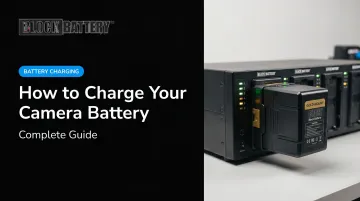
This guide covers how to charge a camera battery correctly — across in-camera USB charging, external charger use, and alternative field methods — with specifics on the discipline that separates batteries that last hundreds of cycles from ones that fade after dozens.
Key Takeaways
- Charge when the battery genuinely needs it — not as a habitual top-off
- Always power off the camera before initiating a charge
- Keep temperatures between 10°C–30°C (50°F–86°F) for optimal battery health
- Watch the indicator: amber/orange = charging; green or off = fully charged
- Disconnect promptly once charging completes — don't leave batteries on the charger indefinitely
When Should You Charge Your Camera Battery?
Lithium-ion batteries — used in virtually every modern camera — don't benefit from being run to zero. Research on lithium-ion cycling shows that cycle life increases with partial state-of-charge cycling and is inversely related to depth of discharge. Running your battery flat repeatedly is one of the fastest ways to shorten its service life.
Canon's EOS R6 manual reinforces this directly: batteries left in the camera when unused can undergo excess discharge and shorter battery life.
The right time to charge:
- When the battery indicator drops noticeably — well before it reaches zero
- The evening before or morning of a shoot
- After returning from a shoot, before storing the battery
Charging habits that shorten battery life:
- Leave the charger connected for days and you risk the shortened cycle life Sony explicitly warns against — disconnect once charging is complete
- Charging in a hot car or freezing location damages battery cells; temperature extremes during charging are particularly destructive (more on this below)
- Topping off a pack that's already nearly full degrades performance over time, per Sony's own battery guidelines
Charge when the battery genuinely needs it. That single habit protects more long-term capacity than any other.
What You Need Before Charging Your Camera Battery
Getting the prerequisites right matters — wrong chargers, inadequate power sources, and temperature extremes all cause failed or partial charges that degrade cells over time.
Compatible Charger or Cable
Voltage and current specifications must match the battery model. Mismatched chargers can damage cells or simply fail to charge. Always check the camera manual for approved charger models and USB power delivery (USB-PD) requirements.
USB-PD minimums vary significantly by camera:
| Camera | Minimum USB-PD Output |
|---|---|
| Sony ZV-E1 | 18W / 9V / 2A |
| Nikon Z6III / Z8 | 27W / 9V / 3A |
| Canon EOS R1 / R5 group | 45W or higher recommended |
Professional cinema cameras using V-Mount, Gold-Mount, or B-Mount batteries operate on a completely separate charger ecosystem from consumer USB-PD.
Block Battery's charger lineup, for example, includes the DFC Charger (V-Mount/B-Mount), the PSU-185 multi-voltage power supply (compatible with SLi-D600 and SLi-300 systems), and the LOGOS Quad 4-channel charger for the LOGOS-150 series.
Appropriate Power Source
- Wall outlet via AC adapter — fastest and most reliable
- USB-PD power bank — must meet the camera's minimum wattage output; confirm compatibility before relying on it in the field
- Computer USB port — slowest option; will pause if the computer sleeps
Ambient Temperature Within Range
Beyond the power source, ambient temperature is the other condition cameras actively monitor. Both Sony (ILCE-1) and Panasonic (DC-S5M2) specify 10°C–30°C (50°F–86°F) as the recommended charging temperature range. Canon documents a slightly broader internal band of 5°C–40°C for the EOS R3. If the charge lamp flashes rapidly or pauses, temperature is often the cause — the camera's protection mechanism has kicked in.
How to Charge Your Camera Battery Step-by-Step
Charging follows a defined sequence. Skipping steps — especially powering down first — leads to incomplete charges or error states that aren't always easy to diagnose on set.
Setup and Preparation
- Insert the battery fully into the camera or external charger until it clicks or seats securely. For V-Mount or Gold-Mount batteries used on professional cinema cameras, ensure the battery is correctly locked onto the mounting plate before connecting any charger cable.
- Power off the camera before connecting any charge source. Most consumer and professional cameras will not charge while powered on — attempting to do so typically routes power to the camera rather than the battery, or triggers a charging error.
Initiating the Charge
- Connect the appropriate cable — micro USB, USB-C, or AC adapter — to the camera's charge port or external charger input.
- Confirm USB-PD wattage if using a third-party adapter or power bank. Nikon's Z8 manual notes that USB Type-C to Type-A cables cannot be used for USB-PD charging; only USB-C to USB-C cables work.
- Watch for the charge indicator — it should illuminate (typically amber or orange) within a few seconds. A rapidly flashing lamp signals an error: incorrect battery type, temperature out of range, or a connection fault.
Monitoring During Charging
Charge times vary by battery capacity, charger output, and temperature. Manufacturer-confirmed examples for common camera batteries:
| Battery / Camera | Method | Full Charge Time |
|---|---|---|
| Canon LP-E6 class (EOS R6) | External charger at 23°C | ~2 hr 30 min |
| Sony NP-FZ100 (ILCE-1) | BC-QZ1 external charger | ~150 min |
| Sony NP-FZ100 (ILCE-1) | In-camera USB | ~285 min |
| Nikon EN-EL15c (Z6III) | In-camera USB-C | ~2 hr 30 min |
| Panasonic DMW-BLK22 (DC-S5M2) | In-camera AC adapter | ~220 min |
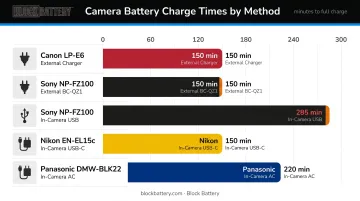
A partially depleted battery charges faster than a fully drained one. Lithium-ion charging uses a constant-current phase followed by a tapering constant-voltage phase — Battery University explains that a battery doesn't need full saturation for use, and can be pulled from the charger before the slow tail completes. Check periodically that the charge lamp remains steadily lit, since a paused or faulted state won't always trigger an alert.
Completing and Disconnecting
- When the lamp turns off or shifts to green, the battery is fully charged — disconnect promptly
- Keeping the battery connected after full charge applies trickle-charge stress that compounds over repeated cycles
- Sony's supplied chargers do shut off automatically at full charge, but Sony still explicitly advises disconnecting after charging completes
Charging Without a Standard Charger (Alternative Methods)
Important: Professional cinema batteries — V-Mount, Gold-Mount, and B-Mount systems — do not support USB-C or USB-PD charging. These systems operate at 14.4V, 24V, 28.8V, and 30V, each requiring dedicated charger infrastructure. The USB alternatives below apply to consumer and prosumer camera batteries only.
- USB wall adapter — connect the camera's USB cable to a USB wall plug; confirm the adapter output meets the camera's minimum wattage requirement. Most reliable USB-C alternative.
- USB-PD power bank — must support the required PD output (27W for most current Nikon mirrorless models). Verify before a shoot; not all power banks sustain the required current draw.
- Computer USB port — connect directly (not through a hub). Slower than AC charging, and charging pauses if the computer enters sleep mode.
Common Camera Battery Charging Mistakes to Avoid
Using Incompatible or Counterfeit Accessories
UL has documented that counterfeit lithium-ion batteries carrying fake safety marks had not been evaluated to appropriate safety standards. The CPSC identifies overheating, fire, electrical shock, and thermal burns as battery-related hazards from improper charging equipment.
For professional production batteries — V-Mount, Gold-Mount, B-Mount — using manufacturer-approved or professional-grade chargers is non-negotiable. Block Battery's chargers (DFC Charger, PSU-185, D-Tap Charger) are built specifically for its battery systems. Using a non-compatible charger on a high-capacity cinema battery is both a performance risk and a safety hazard.
Charging in Extreme Temperatures
- Below 10°C (50°F): Lithium-ion cells risk lithium plating — a form of permanent cell damage where metallic lithium deposits on the anode. Peer-reviewed research identifies low-temperature charging, especially at high charge rates, as a primary cause.
- Above 30°C (86°F): Heat accelerates electrolyte degradation, reducing total capacity over time. Storing or charging at high temperatures while at full charge compounds this effect.
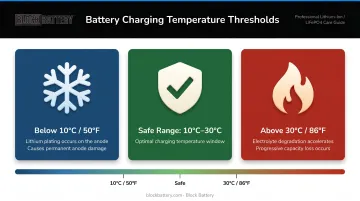
Both failure modes shorten battery service life gradually, compounding across charge cycles before any obvious capacity drop appears.
Topping Off an Already-Full Battery
Repeatedly charging a battery that's already at 90–100% adds charge cycles without meaningful capacity return. Sony's documentation states this explicitly. Charge when the battery needs it, not as a pre-shoot ritual if the battery is already mostly full.
Best Practices for Long-Term Camera Battery Performance
Four habits separate crews that consistently get full-shoot runtime from those who don't:
Charge the night before or morning of a shoot. For multi-camera productions, rotate batteries through a systematic schedule so every unit starts the day at full capacity — not scrambling on set with a charger plugged into a camera between takes.
Store at 40–60% charge between shoots. Battery University reports that after one year at 25°C, recoverable capacity is 96% at 40% charge versus 80% at 100% charge. At 40°C, that gap widens to 85% versus 65%.
Keep terminals and contacts clean. Sony, Canon, and Nikon all document that dirty battery terminals can prevent charging entirely. Wipe contacts with a dry cloth before charging and after outdoor or humid-environment use — this includes the mounting plate contacts on V-Mount and Gold-Mount systems.
Disconnect when charging is complete. Modern chargers include overcharge protection — both Sony's camera chargers and RED's REDVOLT Travel Charger shut off automatically at full charge. Even so, leaving batteries connected for 8–12 hours beyond full generates low-level heat that compounds across hundreds of cycles.
Conclusion
Charging a camera battery correctly comes down to consistent discipline: matching the right charger to your chemistry, keeping temperatures in range, powering the camera off before connecting, and disconnecting promptly when the cycle completes. The same steps, every shoot.
A battery managed consistently across hundreds of charge cycles will outlast one charged carelessly by a significant margin. For working professionals running multi-camera productions, that difference surfaces in lifespan, replacement costs, and the confidence that power won't cut out mid-production.
Whether you're charging a compact mirrorless battery via USB-C or managing a fleet of professional V-Mount batteries across a feature film shoot, the fundamentals don't change. Respect the chemistry, follow the sequence, and disconnect when done.
Frequently Asked Questions
Can camera batteries be recharged?
Yes. Virtually all modern camera batteries are lithium-ion rechargeable cells designed for hundreds of charge cycles. Rechargeability is built into the battery chemistry. There's no need to fully discharge before recharging, and doing so regularly will actually reduce lifespan.
How long does it take to charge a camera battery?
It depends on battery capacity and charger output. Compact lithium-ion camera batteries typically charge in 2.5 to 3 hours via AC adapter. In-camera USB charging is slower — Sony's NP-FZ100 takes approximately 285 minutes via USB versus 150 minutes on the dedicated BC-QZ1 external charger.
Can I use my camera while it's charging?
Most cameras do not charge the battery while powered on. Some support USB power delivery, which powers the camera but doesn't charge the battery; others must be fully off for charging to begin. Check your specific camera manual, as the behavior varies meaningfully between models.
Is it bad to leave a camera battery on the charger overnight?
Modern chargers include overcharge protection and shut off at full charge. That said, habitually leaving batteries connected long after charging completes generates low-level heat that accumulates over repeated cycles — disconnecting promptly is the better long-term practice.
How do I know when my camera battery is fully charged?
The charge indicator lamp turning off, or changing from amber to green, is the standard signal. Some cameras also display a battery percentage on the LCD when connected via USB.
Can I charge a camera battery with a power bank?
Yes, provided the power bank is USB-PD compatible and meets your camera's minimum wattage requirement. Professional cinema cameras such as the Sony FX6 and FX9 typically require at least 18–27W PD output. Not all power banks support the required PD spec, so verify before relying on this method in the field.